Skip to MelioraBMP content
MEET MELIORABMPMELIORA BUSINESS PLATFORM

Your business.
Working together.

From the first sale to the next stock order, bring your everyday operations into one connected workspace.

Sell with confidence. Stay on top of stock. Understand your money. Give your growing retail business the clarity it deserves.

On a compatible phone, tablet or computer.
YOUR BUSINESS AT A GLANCE
CONNECTED OPERATIONSA clearer view. A better next move.
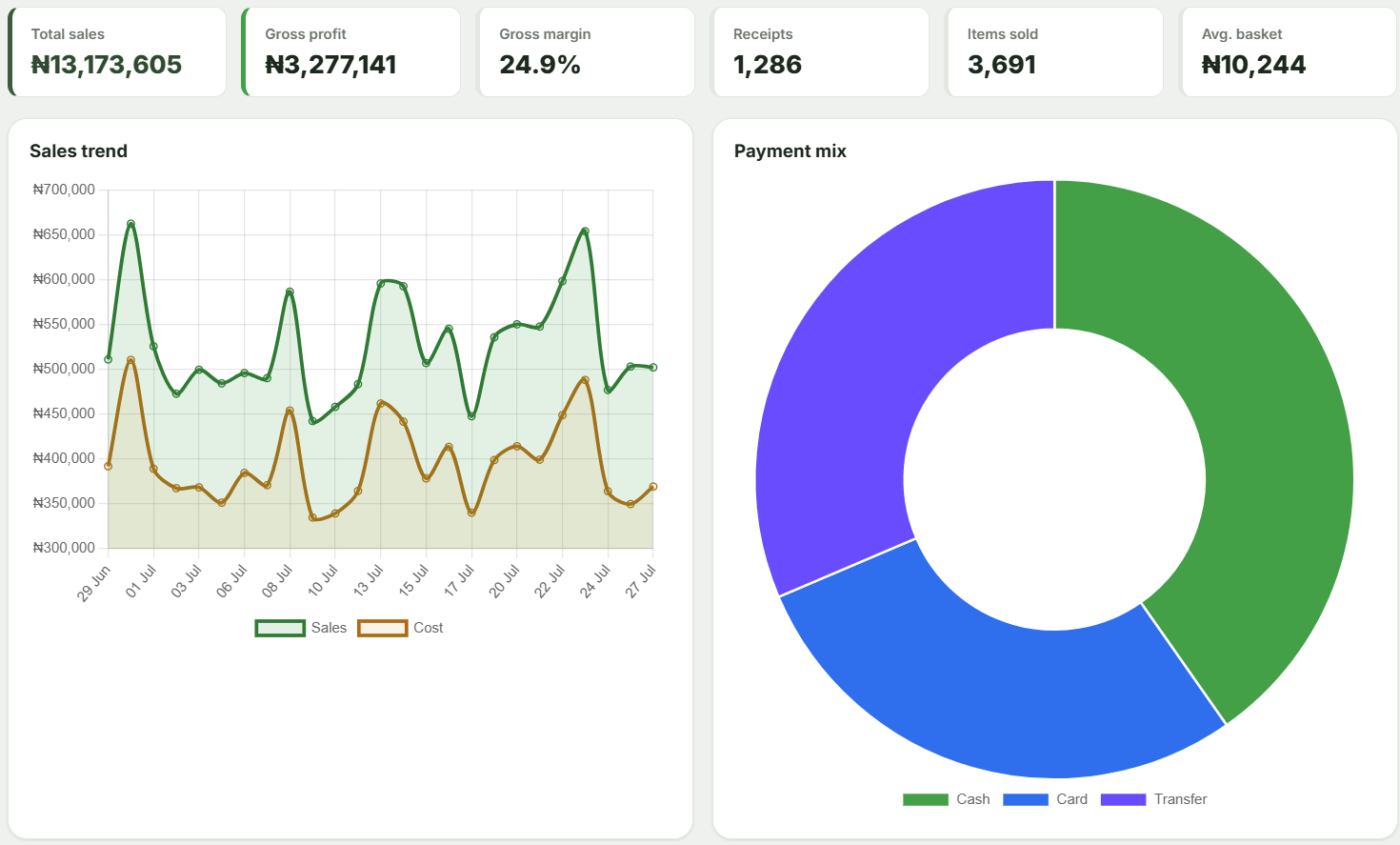
Dashboard preview
Example Meliora dashboard showing total sales, gross profit, sales trends and payment mix.
Keep the counter movingOffline cash sales on a prepared till

Example dashboard. Figures shown are illustrative, not customer results.

THE POINT OF SALE YOU KNOW. A PLATFORM TO GROW WITH.

MelioraPOS has evolved into MelioraBMP. More of your business, connected.

65guided workflows, from the till to the back office
1platform for sales, stock, credit, purchasing and reports
0special hardware to start: use a phone, tablet or computer
14 daysfree trial once your business account is activated

LESS CHASING. MORE KNOWING.

Bring the moving parts
of your business together.

A sale should tell you more than what you earned. Connect it to your stock, your customers and your next decision.

01 / SELL

A smoother sale.
A stronger first impression.

Scan or search products, hold a basket and record cash, card or transfer payments. Print or share a receipt and keep the queue moving.

  • Barcode and SKU lookup
  • Flexible checkout and digital receipts
  • End-of-day sales visibility
02 / STOCK

Know what is on your shelves.

Follow recorded stock movements, spot low quantities and review approaching expiry dates before they become bigger problems.

  • Product imports and stock records
  • Low-stock and expiry alerts
  • Transfers between stores
03 / CUSTOMERS

Build relationships.
Keep credit in view.

Bring customer history, loyalty and credit into the same conversation. Know who owes what, and follow up with confidence.

  • Customer profiles and loyalty points
  • Credit limits and part-payments
  • Ageing and customer statements
04 / OPERATIONS

Make the next stock order count.

Connect purchasing, suppliers and receiving. Review replenishment suggestions and move stock between branches with a clear record.

  • Purchase orders and supplier responses
  • Invoice review and stock receiving
  • Multi-store replenishment
05 / VISIBILITY

See the business behind the sales.

Review sales and margins, track expenses and approvals, and follow internal account records. Give staff the access their roles need.

  • Owner dashboards and reports
  • Expenses and internal Financial Books
  • Staff permissions and audit trails
06 / ONLINE SELLING

Take your Main Store beyond the counter.

Give customers an online catalogue to browse, order and pay. Keep pickup or merchant-arranged delivery connected to your store.

  • A branded Main Store storefront
  • Online ordering and Paystack checkout
  • Order tracking and fulfilment

Choose the capabilities that fit your business. Features vary by subscription, staff permissions and setup. Explore the plans

MADE FOR EVERYDAY RETAIL

Supermarkets · Pharmacies · Provision stores · Fashion & beauty · Electronics · Growing retail chains

WHY BUSINESSES SWITCH

Swap the juggling
for real clarity.

Without a connected platformWith MelioraBMP

Sales written in a notebook and totalled at night

Every sale recorded with the cashier, time and payment method

Stock counts that never quite match the shelf

Stock that moves with every sale, delivery, return and transfer

Credit customers kept in memory, or a notebook

Credit limits, balances, statements and reminders in one place

Guessing what to reorder, and when

Low-stock and expiry alerts, plus replenishment suggestions

Profit known at month end, if at all

Sales, gross profit and margin on your owner dashboard

Cash drawer differences nobody can explain

End-of-day declarations compared with what the till recorded

BUILT FOR THE REAL WORKING DAY

The connection drops.
Your cash sales don’t have to.

Prepare your till while online. When the network is interrupted, continue cash sales with your cached catalogue and local receipts. Synchronize when you reconnect.

See the platform in action
  1. 01

    Prepare online

    Sign in and load the catalogue on your till before you need it offline.

  2. 02

    Keep taking cash sales

    Save sales on the prepared device and issue local receipts.

  3. 03

    Reconnect. Synchronize. Review.

    Send queued sales back to your business records when connectivity returns.

Card, transfer and credit workflows need connectivity. Keep device storage intact until queued sales have synchronized.

A CLOSER LOOK

Start in minutes.
Then see it all in action.

Follow the signup walkthrough at your own pace, then take a guided tour of every MelioraBMP workflow.

Open the videos page
01
START YOUR JOURNEY

Your signup, step by step.

Getting started · 3 min

Why your business needs MelioraBMP, and how to create your account, get activated and make your first sale.

Ready? Create your account
02
EXPLORE THE PLATFORM

MelioraBMP, explained.

Walkthrough · 9 min

Every workflow, step by step: selling, stock, customers and credit, purchasing, branches, online orders and reports.

Play, pause and revisit at your own pace

THE CLIENT PERSPECTIVE

Real people.
Real businesses.
Their own words.

Choosing a platform is a business decision. Hear clients share their experiences with MelioraBMP.

Let’s talk about your business Open the client stories page
Better business starts
with a conversation.
CLIENT STORY / 01

The MelioraBMP experience

A client shares their perspective.

CLIENT STORY / 02

Working with Meliora

Hear the story, in their own words.

YOUR NEXT CHAPTER

From “let’s try it”
to your first sale.

  1. 01

    Create your business account

    Register your business details and preferred currency. Follow the activation process to begin your trial.

  2. 02

    Make the platform your own

    Add or import products, set up your store and give your team the access they need.

  3. 03

    Sell, learn and grow

    Run your first transactions, review the reports and choose the plan that fits your next stage.

Prefer a guided introduction? We’ll help you explore the workflows that matter to your business.

Request a demo

START WHERE YOU ARE

The right fit today.
Room for what’s next.

From an owner-operated shop to a growing retail network, choose the level of support and control you need.

GET THE ESSENTIALS RIGHT

Starter

For the everyday rhythm of a small shop.

  • Core point of sale
  • Products and basic stock
  • Receipts and essential sales reports
Explore Starter
SEE MORE. MANAGE MORE.

Business

For growing stores that need deeper visibility.

  • Everything in Starter
  • Owner insights and advanced inventory
  • Expenses and customer credit
Explore Business
PLAN YOUR NEXT CHAPTER

Enterprise

For larger teams with specific requirements.

  • Operations capabilities
  • Agreed team capacity
  • Assisted onboarding and service arrangements
Discuss your requirements

See current pricing, user allowances and subscription options on the MelioraBMP plans page ↗.

GOOD TO KNOW

A little clarity
before you begin.

Have a question about your own setup?

Speak with the Meliora team
Is MelioraBMP the same as MelioraPOS?

MelioraPOS has grown into MelioraBMP — Meliora Business Platform. It builds on point of sale with connected workflows for stock, customers, purchasing, expenses, reporting and online selling. Existing customers continue with their existing account and sign-in.

Do I need to buy special hardware?

You can use a supported browser on a compatible phone, tablet or computer. Barcode scanning, receipt printing and sharing depend on your device, browser and printer setup. Our team can help you check compatibility before you make a hardware decision.

What can I do without an internet connection?

Once you have signed in and prepared your till online, you can look up cached products, take cash sales and issue local receipts. Card, transfer and credit workflows need connectivity. Keep your browser storage intact and synchronize queued sales after reconnecting.

Can I manage multiple shops or sell online?

Operations and Enterprise support additional stores within configured limits, stock transfers and replenishment workflows. The online storefront represents your Main Store, with ordering, Paystack checkout and order tracking. Pickup and delivery are arranged by your business.

Can I bring my existing products into MelioraBMP?

Yes. Product CSV import helps you load your catalogue. Customer history, opening credit balances and other historical records need a separate migration assessment. Start with a small pilot and let us help you plan the transition.

Does Financial Books replace my accounting software?

Financial Books supports internal account ledgers, supplier obligations, journals and manual reconciliation against statements. It is not an automatic bank feed, payment service or complete statutory accounting package. This Operations-level module requires setup.

How do I get started or choose a plan?

Watch the signup walkthrough, register your business and follow the activation process. Your trial begins after account activation. Review current pricing and features on the plans page, or request a demo so we can help you choose the right fit.


BETTER BUSINESS, EVERY DAY.

Give your ambition
a platform to grow.

Your sales, your stock, your people, your next chapter.
Bring them together with MelioraBMP.